
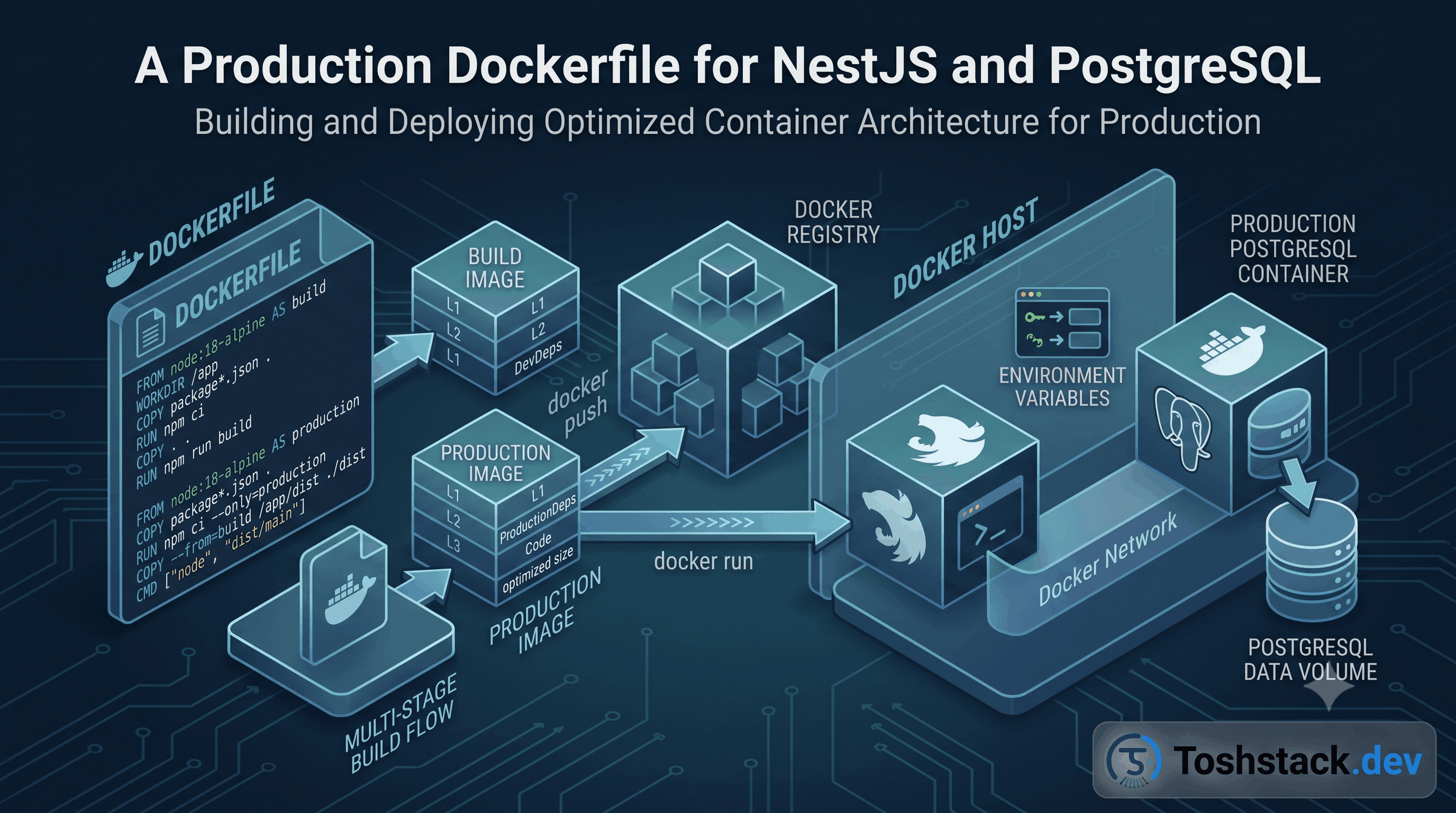
A Dockerfile copied straight from a tutorial usually works — and usually ships a 900MB image with dev dependencies, a shell full of build tools, and a container running as root. None of that matters until it does: image pull times, attack surface, and the day someone asks why the container needs curl, git, and a C compiler just to serve JSON.
Multi-stage builds: compile with everything, ship with nothing extra
The build stage installs all dependencies (including dev) and runs nest build; the final stage starts from a clean base image, copies only dist/, node_modules reinstalled with --omit=dev, and package.json. Everything used to compile TypeScript — the TypeScript compiler itself, ts-node, test runners — never reaches the image that actually runs in production.
# ---- build stage ----
FROM node:22-alpine AS build
WORKDIR /app
COPY package.json pnpm-lock.yaml ./
RUN corepack enable && pnpm install --frozen-lockfile
COPY . .
RUN pnpm run build

# ---- runtime stage ----
FROM node:22-alpine AS runtime
WORKDIR /app
ENV NODE_ENV=production
COPY package.json pnpm-lock.yaml ./
RUN corepack enable && pnpm install --frozen-lockfile --prod
COPY --from=build /app/dist ./dist

RUN addgroup -S app && adduser -S app -G app
USER app

EXPOSE 3000
HEALTHCHECK --interval=30s --timeout=3s CMD node dist/healthcheck.js || exit 1
CMD ["node", "dist/main.js"]
Never run the container as root
The default user in most base images is root, and a remote code execution bug in any dependency inherits whatever the container process can do. Creating an unprivileged user and switching to it with USER app before CMD costs three lines and removes an entire class of container-escape severity from any future vulnerability.
- Use
.dockerignoreto excludenode_modules,.git, anddistfrom the build context — a large context slows every build even for a one-line change. - Pin the base image tag (
node:22-alpine, notnode:latest) so a base image update cannot silently change your runtime behind CI's back. - Alpine images are smaller but use
muslinstead ofglibc— verify any native dependency (likeargon2orsharp) has a musl-compatible build before committing to it. - A
HEALTHCHECKlets an orchestrator (Docker Compose, Kubernetes, ECS) restart a container that is up but not actually serving requests, not just one that has crashed. - Never bake secrets into an image layer with
ENVorARG— they persist in the image history even if a later layer overwrites them.
Local Postgres that matches production, via Compose
A docker-compose.yml that runs the API and Postgres together, with a named volume for the database, gives every contributor the same database version and the same connection settings as CI — no more "works on my machine" caused by a locally installed Postgres 14 against a production Postgres 16.
services:
  api:
    build: .
    env_file: .env
    depends_on:
      db:
        condition: service_healthy
    ports: ["3000:3000"]

  db:
    image: postgres:16-alpine
    environment:
      POSTGRES_PASSWORD: ${DB_PASSWORD}
    volumes:
      - pgdata:/var/lib/postgresql/data
    healthcheck:
      test: ["CMD-SHELL", "pg_isready -U postgres"]
      interval: 5s
      retries: 10

volumes:
  pgdata:
depends_onwith a healthcheck condition, not a bare service name, is what actually prevents the API container from starting before Postgres is ready to accept connections — a bare dependency only waits for the container to start, not for the database inside it to be usable.
Secrets belong in the environment, never in the image
A docker-compose.yml committed to version control cannot contain a real database password, which is why the working pattern is env_file: .env with .env itself gitignored — Compose injects the values at container start, and the file holding them never enters the image or the git history. Anyone who needs local credentials gets a .env.example with placeholder values and fills in their own.
services:
  api:
    build: .
    env_file: .env      # gitignored — real secrets live only here
    environment:
      NODE_ENV: production
    # NOT: environment: { DB_PASSWORD: hardcoded-value }
In a real deployment, .env itself is usually replaced by a secrets manager (AWS Secrets Manager, Doppler, or the container platform's own secret store) injecting environment variables at runtime — the local Compose pattern is a stand-in for that, not the production mechanism itself.
- Never
COPY .envinto a Dockerfile — even a file deleted in a later layer still exists in the image's layer history and can be extracted. - Rotate any secret that was ever accidentally committed, even if the commit was later removed — git history is not a security boundary.
- A
docker inspecton a running container can reveal environment variables to anyone with access to the host, so treat container access itself as sensitive.
Sizing container resources instead of guessing
A container with no memory limit can consume the entire host under a traffic spike or a memory leak, taking every other service on that host down with it; a container with a limit set too low gets OOM-killed under completely normal load. The right numbers come from watching actual usage under realistic load, not from copying a number out of a tutorial.
services:
  api:
    build: .
    deploy:
      resources:
        limits:
          memory: 512M
          cpus: '1.0'
        reservations:
          memory: 256M
Node.js's own heap needs to stay comfortably under the container memory limit — --max-old-space-size set close to or above the container limit causes the process to be killed by the container runtime before Node's own garbage collector gets a chance to react to memory pressure, which looks like a random crash instead of the resource limit it actually is.
- Load test with a tool like
autocannonork6against the actual container, not the barenodeprocess on a dev machine, before committing to a memory limit. - A
reservations.memorylower thanlimits.memorygives the scheduler room to pack containers efficiently while still guaranteeing a floor. - Watch
docker stats(or the equivalent orchestrator metric) over at least one full traffic cycle, not a five-minute smoke test, before finalizing limits.
Keeping the local and production images honestly identical
A separate Dockerfile.dev with hot-reload tooling that diverges from the production Dockerfile is a common source of "works in dev, breaks in prod" bugs — a dependency only installed in the dev image, a Node flag only set locally. Using build stages inside a single Dockerfile (a dev target with hot-reload, a production target without it) keeps both images built from the same base and the same dependency install step, so the only real difference is the final CMD.
Running the actual production image locally at least once before every deploy — not just the dev-mode container — catches the class of bug that only exists in the image nobody runs until it reaches a server.
Layer ordering in the Dockerfile is itself a performance lever most teams overlook: Docker caches each layer, invalidating everything below it once a layer changes, so copying package.json and running pnpm install before copying the rest of the source means a code-only change reuses the cached dependency layer instead of reinstalling every dependency on every single build — often the difference between a ten-second incremental build and a three-minute one.
One more habit worth adopting: pin the exact digest of a base image, not just its tag, for anything that must be byte-for-byte reproducible across a security audit — a tag like node:22-alpine can point at a different underlying image after an upstream rebuild, while a digest (node:22-alpine@sha256:...) never changes what it resolves to, trading a small amount of manual update effort for a guarantee that the image built today is exactly the image that will build in six months.
Conclusion
A production-ready Docker setup for NestJS and Postgres is mostly about what you leave out: dev dependencies, root privileges, secrets in layers, and a database version that drifts from what CI and production actually run. Multi-stage builds and a healthcheck-aware Compose file solve all four with no extra tooling.