
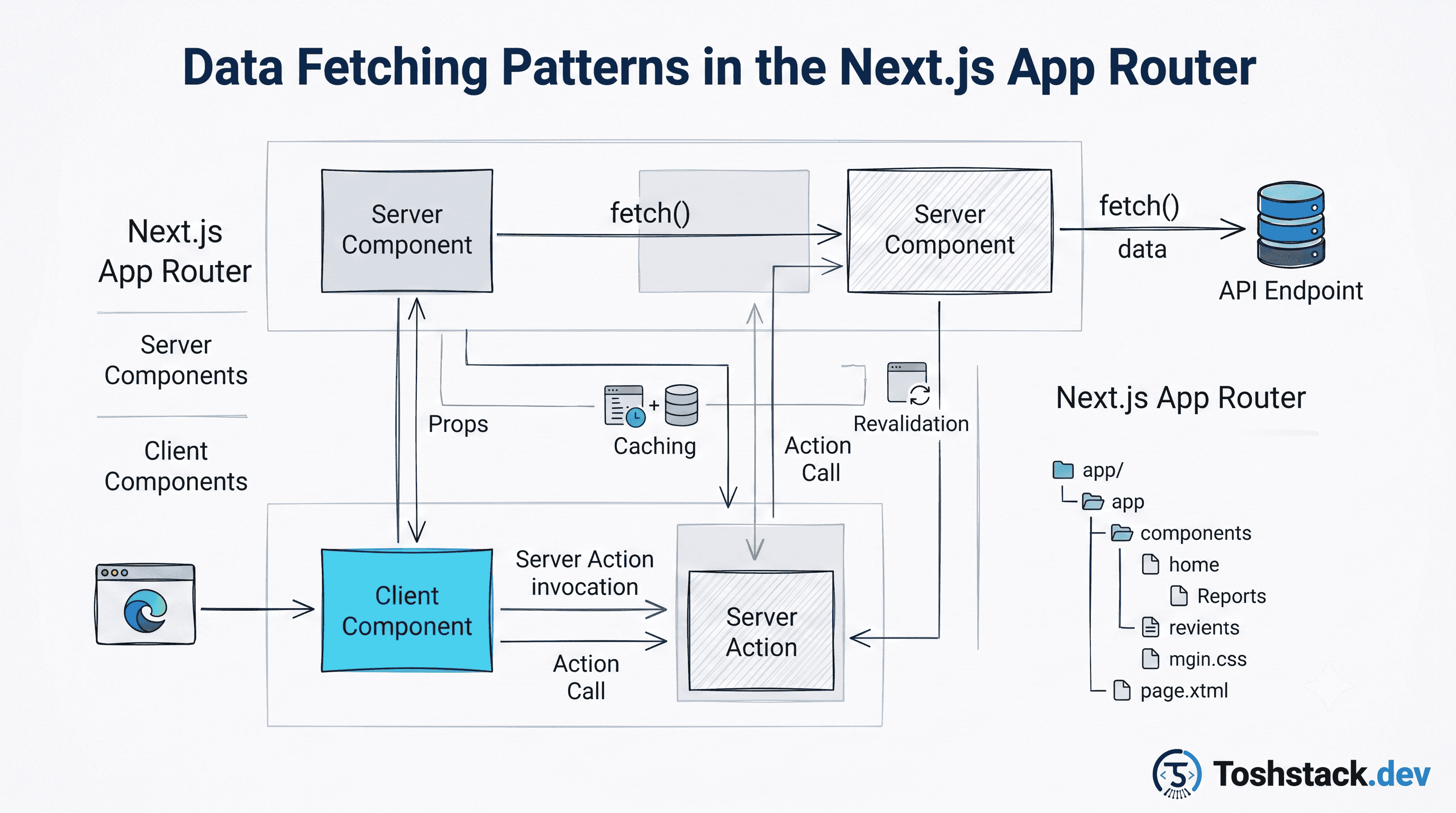
The App Router inverted the default: fetching now happens on the server, inside the component that needs the data, with no client-side useEffect and no loading spinner unless you explicitly ask for one. That is a real improvement, but it only pays off if you understand what gets cached, what gets re-rendered, and what still needs to move to the client.
Server components fetch directly, no API layer required
A server component can await fetch() or call a database client directly in its body, because it never ships to the browser — only its rendered output does. There is no waterfall of "render a shell, then fetch, then render again" unless you build one yourself by nesting client components with their own effects.
// app/blog/[slug]/page.tsx
export default async function BlogPostPage({
  params,
}: { params: Promise<{ slug: string }> }) {
  const { slug } = await params;

  const post = await fetch(`${API_URL}/blog-posts/${slug}`, {
    next: { revalidate: 3600, tags: [`post-${slug}`] },
  }).then((res) => {
    if (!res.ok) notFound();
    return res.json();
  });

  return <BlogPostView post={post} />;
}
The cache is the whole point
Next.js extends the native fetch with a caching layer keyed by URL and options. next: { revalidate: 3600 } means "serve stale for up to an hour, then revalidate in the background" — time-based ISR without a separate build step. tags lets a mutation invalidate exactly the entries it affects via revalidateTag('post-my-slug') from a server action, instead of waiting out a timer or nuking the entire cache.
- Fetch in parallel by starting all the promises before awaiting any of them —
await Promise.all([getPost(slug), getRelated(slug)])— not oneawaitper line. - Push slow, non-critical data behind a
<Suspense>boundary so the rest of the page can stream in first. - Use
cache: 'no-store'(orrevalidate: 0) only for data that is genuinely request-specific, like an authenticated user's cart — it opts the whole request out of static optimization. - Co-locate the fetch with the component that needs the data instead of one giant
getPageData()at the top — React automatically dedupes identical fetches within a render. - Read cookies or headers only where you actually need them; doing so anywhere in the tree forces that route to render dynamically.
Streaming with Suspense turns waterfalls into progress
Wrapping a slow section in <Suspense fallback={<Skeleton />}> lets the server send the fast parts of the page immediately and stream the slow part in once it resolves, without blocking the whole route on the slowest query. This is the App Router feature that most changes perceived performance: users see structure and above-the-fold content while comments, recommendations, or an aggregate count are still loading.
export default async function ProductPage({ params }) {
  const { slug } = await params;
  const product = await getProduct(slug); // fast, blocks initial paint

  return (
    <>
      <ProductHero product={product} />
      <Suspense fallback={<ReviewsSkeleton />}>
        {/* This component fetches its own data and streams in later. */}
        <ProductReviews productId={product.id} />
      </Suspense>
    </>
  );
}
Suspense boundaries are a performance tool, not a correctness tool. Put them around the slow, secondary content — not around data the page cannot render meaningfully without.
When you still need a client-side fetch
Server fetching covers the initial render, but anything that refetches in response to user interaction — infinite scroll, a live filter, optimistic mutations — still belongs on the client, typically with a library like TanStack Query layered on top of a "use client" component. The two are not competitors: render the first page on the server for speed and SEO, then let the client take over for interaction.
Mutations belong in Server Actions, not API routes
A Server Action is a function marked 'use server' that can be called directly from a form or a client component without hand-writing a fetch call or an API route to receive it — Next.js generates the network boundary for you, including CSRF protection on the generated endpoint. For a form submission, it collapses "define an API route, write a fetch call, handle the response" into one function.
// app/products/[slug]/actions.ts
'use server';

export async function addToCart(productId: string, tierId: string) {
  const session = await getSession();
  await cartsService.addItem(session.userId, productId, tierId);

  // Invalidate the cached cart badge everywhere it is rendered.
  revalidateTag('cart');
}

// In a form, no client-side JavaScript required for the base case:
<form action={addToCart.bind(null, product.id, tier.id)}>
  <button type="submit">Add to cart</button>
</form>
Pairing a Server Action with revalidateTag closes the loop the fetch caching model opens: the action performs the write, then invalidates exactly the cache entries that write affects, so the next render — even a cached one — reflects the change without a manual client-side refetch.
- Server Actions still run on the server and can access secrets and the database directly, same as a server component.
- For progressive enhancement, a form using a Server Action works even with JavaScript disabled — a plain API route wired to
fetchon the client does not. - Validate input inside the Server Action itself; it is a public network endpoint under the hood, not a trusted internal function call.
loading.tsx and error.tsx: state the App Router handles for you
A loading.tsx file next to a page.tsx is automatically wrapped around it as a Suspense fallback — no manual <Suspense> boundary required for the top-level route transition itself, only for finer-grained streaming inside the page. An error.tsx file similarly becomes an error boundary for that route segment, catching a thrown error from the server component and rendering a recovery UI instead of a blank screen or a framework-level crash page.
// app/blog/[slug]/loading.tsx — shown while the route's data fetch is in flight
export default function Loading() {
  return <PostSkeleton />;
}

// app/blog/[slug]/error.tsx — must be a client component
'use client';
export default function Error({ error, reset }: { error: Error; reset: () => void }) {
  return (
    <div>
      <p>Something went wrong loading this post.</p>
      <button onClick={reset}>Try again</button>
    </div>
  );
}
The reset function re-renders the segment from scratch, re-running the failed data fetch — useful for a transient network error, useless for a genuinely missing post, which should call notFound() in the page itself to render the sibling not-found.tsx instead of routing through the error boundary at all.
Revalidating on a schedule versus revalidating on demand
Time-based revalidation (next: { revalidate: 3600 }) is the right default for content nobody is actively watching change — a blog post, a static page — where "eventually consistent within an hour" is an acceptable trade for simplicity. On-demand revalidation via revalidateTag or revalidatePath, triggered from the exact mutation that changed the data, is the right choice whenever a user expects to see their own change reflected immediately, such as right after editing their own product listing.
Mixing both is normal and often necessary: a product page might revalidate on a schedule for general freshness while also being explicitly revalidated the moment an admin publishes an edit, so the common case stays cheap and the important case stays instant.
Conclusion
The App Router's data fetching model rewards fetching close to where data is used, tagging cache entries so mutations can invalidate precisely, and reserving Suspense for content that can genuinely arrive late. Get those three right and most pages need no client-side fetching library at all for their first render.